Code
library(ggpp)
my.cars <- mtcars[c(TRUE, FALSE, FALSE, FALSE), ]
my.cars$name <- rownames(my.cars)
p <-
  ggplot(my.cars, aes(wt, mpg, label = name)) +
scale_colour_discrete(l = 40) # luminance, make colours darkerGeoms geom_text_s() and geom_label_s() from ‘ggpp’ are enhanced versions of geom_text() and geom_label() from ‘ggplot2’. In this web page I discuss what the enhancements are and what is the rationale behind their design. I demonstrate with examples how the enhanced features in geom_text_s() and geom_label_s() can be used to add more effective and visually attractive data labels to ggplots.
ggpp pkg, ggplot2 pkg, data visualization, dataviz
Versions of package ‘ggpp’ released before 0.5.0 included a preliminary attempt at the design of these geometries based on a different logic and interface. At the time of writing, version 0.5.2 is available through CRAN. To reproduce the examples at the end of this page please use ‘ggpp’ (>= 0.5.0) and preferably ‘ggpp’ (>= 0.5.2).
I have defined in package ‘ggpp’ enhanced versions of geom_text() and geom_label() under the names of geom_text_s() and geom_label_s() . The s is for segment, at least it was when I thought of these names. The versions described are included in ‘ggpp’ (>= 0.5.0).
Data labels are text semantically connected to individual data observations or individual data summaries depicted on the plot canvas (Koponen and Hildén 2019). The idea of better supporting the use of data labels in plots created with R package ‘ggplot2’ is not new. I have been for a long time a happy user of the repulsive geometries geom_text_repel() and geom_label_repel() from package ‘ggrepel’. I have even contributed some code to ‘ggrepel’. However, some time back when designing some new position functions, the idea of developing non-repulsive geometries suitable for displaced data labels started growing on me. From a graphical design perspective, I also found at times geom_text() and geom_label() to have limitations.
Before version 4.0.0 of ‘ggplot2’, in geom_text() transparency set with alpha was applied to the text while in geom_label() it affected only fill. In geom_label() the colour aesthetics controlled at the same time the colour of the text and of the line bordering the label; label.size controlled the size of the border line, but as a parameter rather than an aesthetic. This meant that it was not possible to use the border width, its absence or its colour to highlight selected data labels. Lack of support for the linetype aesthetic of the border, made it difficult to highlight individual data labels in black and white printing. Thus changed significantly in ‘ggplot2’ (>= 4.0.0). However, use cases remain where the additional flexibility brought by the different approach used in ‘ggpp’ by geom_text_s() and geom_label_s() are either necessary, e.g., connecting segments and arrows, or at least more convenient, e.g., targeting of aesthetic mappings to specific elements of the graphical objects (grobs) created by the geoms.
When designing geom_text_s() and geom_label_s(), I aimed from the start to keep the use of any new geometries simple, and as consistent with the grammar of graphics as possible. The interfaces of geom_text_s() and geom_label_s() are stable. Thus, these geometries are very likely to remain backwards compatible in future versions of ‘ggpp’. By default geom_text() and geom_label() behave (almost?) as their counterparts from ‘ggplot2’ (< 4.0.0). They do not make use of new aesthetics as geom_text_repel() and geom_label_repel() do, instead, they rely on additional formal parameters to target the mapped aesthetics.
The decision to use a targeting mechanism instead of duplicating existing aesthetics, is that multiple inconsistent mappings of variables to the same graphical property can make interpreting a plot difficult (Koponen and Hildén 2019). Targeting of aesthetics adds flexibility without weakening the Grammar of Graphics principle of allowing only a single mapping per aesthetic property within a plot, e.g., I see enforcing a single meaning for colour values within a plot as a fundamental design principle for data visualizations.
The enhancements are: 1) if used with one of the position functions from ‘ggpp’, which keep the original position, segments are drawn connecting the text or label to the observation. The justification, vjust and hjust and thus the anchoring point of the segment to the text or label are computed automatically based on the direction of displacement. 2) A new formal parameter colour.target makes it possible to control to which components of the graphical element (grob) to apply the mapped colour aesthetic and to which elements to apply the default colour. 3) Similarly a new formal parameter alpha.target allows similar control of the application of the mapped alpha aesthetic values and which ones obey the default alpha. Currently supported elements are "text", "segment", "box.line" and "box.fill" in any combination, and "box" and "all" as aliases to save typing. 4) Add support for linewidth and linetype aesthetics in geom_label_s() applying them to the box border line, independently of segment.linewidth which is a parameter. The approach used in geom_text() and geom_label() from ‘ggplot2’ (>= 4.0.0) is different and not as flexible.
The use of segments or arrows to make clear to which data observation data labels are linked is frequent except in very sparse clouds of observations. Using by default automatic justification "position" based on the direction of displacement by nudging, dodging, etc., to select the anchor point ensures that short segments will not cause difficulties even with long text labels. It also means that small displacements away from observations are enough to avoid overlaps between label and the labelled observation. The vjust and hjust aesthetics except for the support of the additional value "position", work as in ‘ggplot2’, accepting the same values as geom_text() and geom_label() and to the same effect.
In the case of these two geometries, the design stage was time-consuming and included attempts that in use resulted awkward. Implementation of the new features was straightforward. The examples below show some of the new possibilities for the graphical design of text label annotations in ggplots that geom_text_s() and geom_label_s() make possible.
While the positions of labels when using geom_text_repel() and geom_label_repel() are determined during plot rendering and dependent on the theme and dimensions of the rendered plot as passed to graphic devices, in the case of geom_text_s() and geom_label_s(), similarly to with geom_text() and geom_label(), the positions are determined earlier and dependent on the mapped data and positions added to the "gg" object. Depending on the use case, repulsion during plot rendering can be an advantage or a hindrance.
Above each plot you will find the code used to create the figures, “folded” behind a triangle and the word Code. Clicking on the triangle or on “Code” makes the code visible/hidden. The code can be easily copied by clicking on the icon that appears when the cursor in on the upper right corner of the box.
The code used for the individual plots requires the code in the code chunk immediately under this call out to be run first, to attach the packages used, prepare the data and save a base plot with name p to which plot layers are added in later examples.
library(ggpp)
my.cars <- mtcars[c(TRUE, FALSE, FALSE, FALSE), ]
my.cars$name <- rownames(my.cars)
p <-
ggplot(my.cars, aes(wt, mpg, label = name)) +
scale_colour_discrete(l = 40) # luminance, make colours darkerA simple example, using nudging to displace the labels.
# Use nudging
p +
  geom_text_s(nudge_x = 0.12) +
  geom_point() +
  expand_limits(x = 6.2)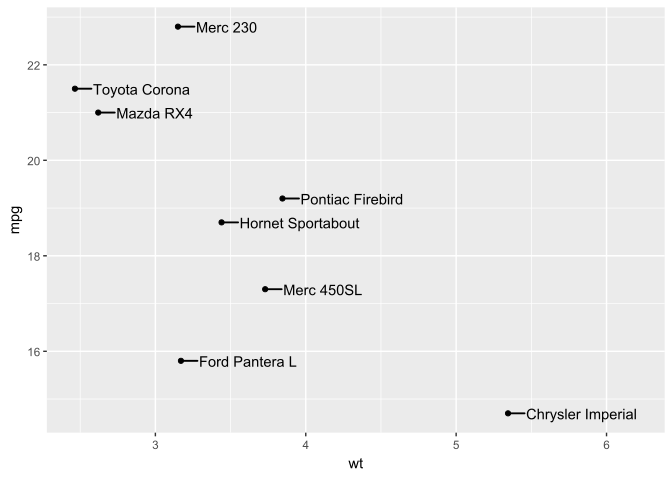
We add arrow points to the segments.
p +
  geom_text_s(nudge_x = 0.15,
              arrow = arrow(length = grid::unit(1.5, "mm")),
              point.padding = 0.4) +
  geom_point() +
  expand_limits(x = 6.2)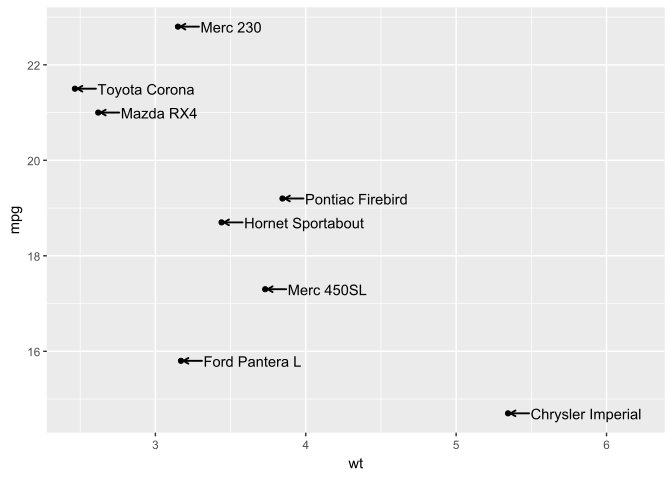
Using colour with the default target, which, consistently with geom_text() is the text element of the composite grobs.
p +
  geom_text_s(aes(colour = factor(cyl)),
              angle = 90,
              nudge_y = 1) +
  geom_point() +
  expand_limits(y = 27)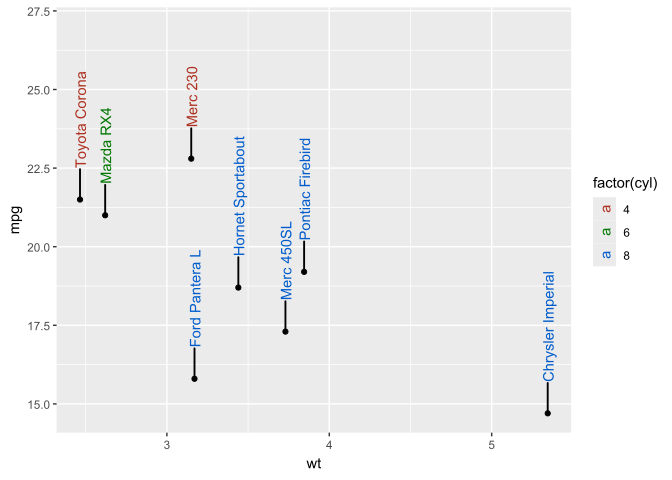
We can select a different graphic element as the target for the colour aesthetic, here we apply colour to the connecting segments.
p +
  geom_text_s(aes(colour = factor(cyl)),
              colour.target = "segment",
              angle = 90,
              nudge_y = 1,
              show.legend = FALSE) +
  geom_point(aes(colour = factor(cyl))) +
  expand_limits(y = 27)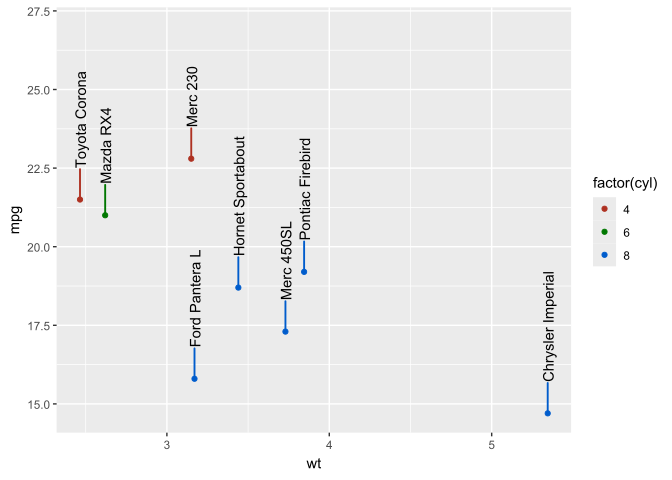
And here we apply colour to all the elements created by geom_text_s().
p +
  geom_text_s(aes(colour = factor(cyl)),
              colour.target = "all",
              angle = 90,
              nudge_y = 1) +
  geom_point() +
  expand_limits(y = 27)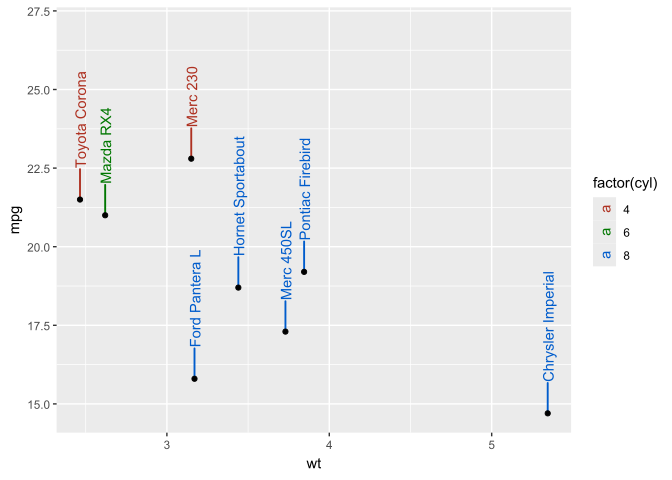
In the case of geom_label_s() additional targets for colour are available. We start with the default, that is consistent with geom_label() applying the colour aesthetic to the border line and text.
p +
  geom_label_s(aes(colour = factor(cyl)), nudge_x = 0.3) +
  geom_point() +
  expand_limits(x = 7)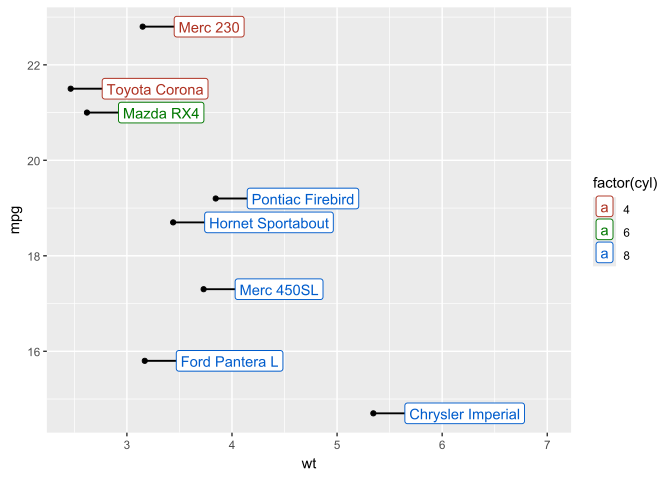
We set the default colour to "grey50" to make segments and box borders less prominent, achieving a calm design.
p +
  geom_label_s(aes(colour = factor(cyl)),
               colour.target = "text",
               default.colour = "grey50",
               linewidth = 0.4,
               nudge_x = 0.3) +
  geom_point() +
  expand_limits(x = 7) +
  theme_bw()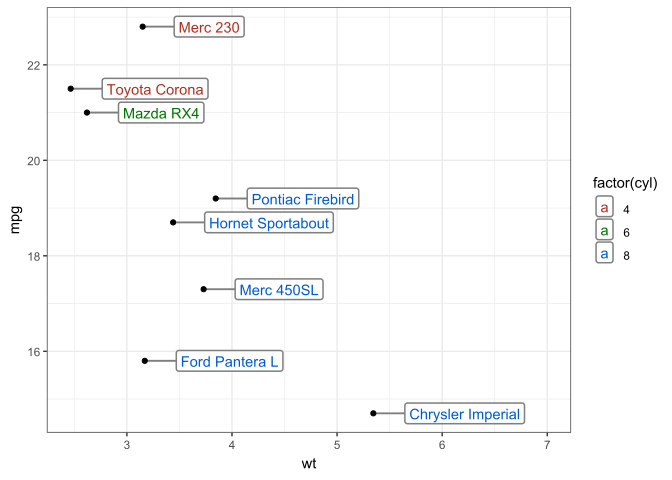
We can use the opposite approach, keeping the text black for maximum legibility at a small size and apply colour to the remaining elements.
p +
  geom_label_s(aes(colour = factor(cyl)),
               size = 2.8,
               colour.target = c("box", "segment"),
               linewidth = 0.4,
               nudge_x = 0.3) +
  geom_point(aes(colour = factor(cyl))) +
  expand_limits(x = 7)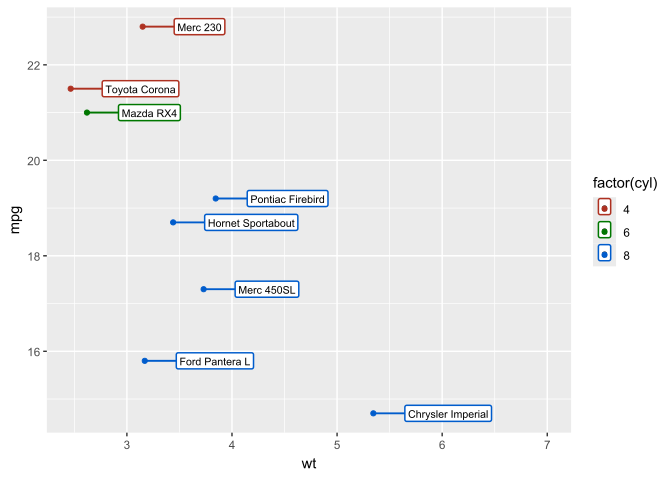
Aesthetic linetype can be used to unobtrusively highlight some labels in the previous plot.
p +
  geom_label_s(aes(colour = factor(cyl), linetype = grepl("Merc", name)),
               size = 2.8,
               colour.target = c("box", "segment"),
               linewidth = 0.4,
               nudge_x = 0.3,
               show.legend = FALSE) +
  geom_point(aes(colour = factor(cyl)), size = 3) +
  expand_limits(x = 7)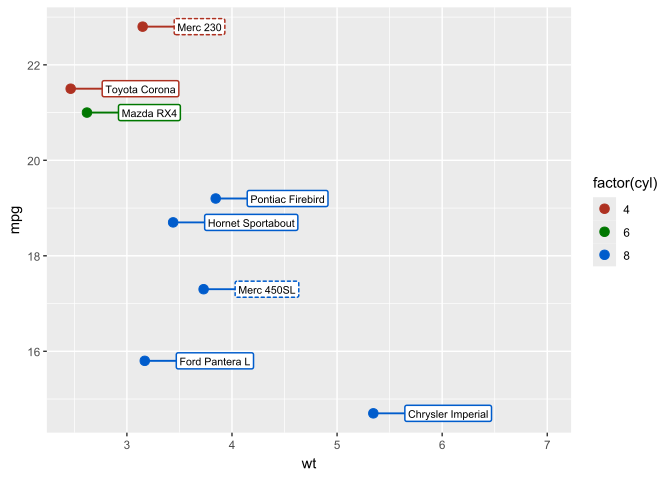
A visually simple and space-saving design, by combining fill and colour but suppressing the box border.
p +
  geom_label_s(aes(colour = factor(cyl), fill = factor(cyl)),
               nudge_x = 0.2,
               size = 3.5,
               colour.target = "all",
               alpha.target = c("box", "segment"),
               alpha = 0.15,
               linewidth = 0,
               segment.linewidth = 1,
               label.padding = grid::unit(0.12, "lines")) +
  geom_point(aes(colour = factor(cyl)), size = 2) +
  expand_limits(x = 7) +
  theme_bw()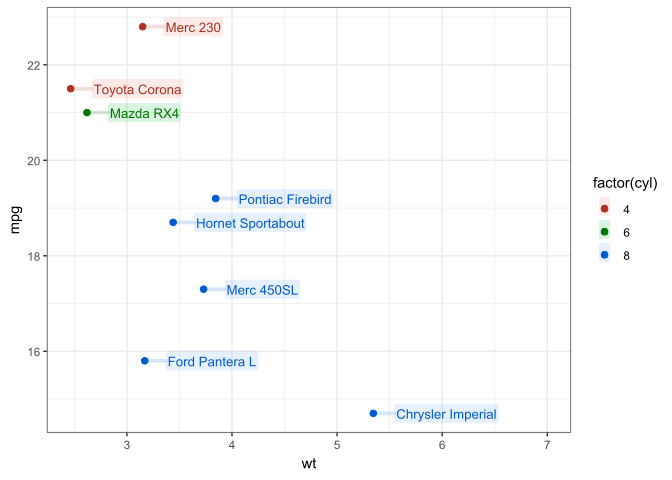
If we disable the plotting of segments, geom_tetx_s() behaves like geom_text() and geom_label_s() as geom_label() except for the flexibility in the mapping of colour and alpha aesthetics in geom_label_s() and the default justification "position".
p +
  geom_text_s(aes(colour = factor(cyl)),
              add.segments = FALSE,
              angle = 90,
              nudge_y = 0.3,
              show.legend = FALSE) +
  geom_point(aes(colour = factor(cyl))) +
  expand_limits(y = 27)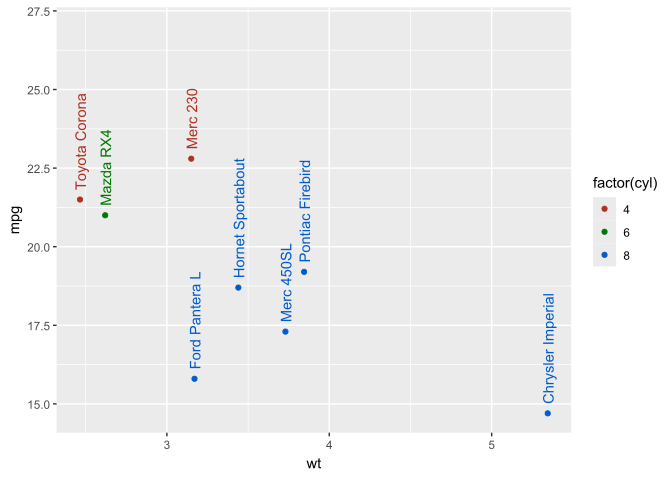
For additional information, please, see the help page for geometries geom_text_s() and geom_label_s() and the documentation of package ‘ggpp’, including a vignette.
Chapter 9 in Aphalo (2024) provides a short introduction to ‘ggplot2’, ‘ggpp’, ‘ggpmisc’ and other extensions.